

Type "image optimization" into Google and you'll get a wall of advice about compression and WebP. Almost nobody talks about the two lines of text that matter more than file size: the alt attribute. And here's the frustrating part — most sites still get it wrong, including some I've audited recently where the alt text was literally "IMG_2847.jpg".
Optimizing image alt text for SEO is not about stuffing keywords into a hidden field. It's about writing a short, honest description that serves three audiences at once: someone using a screen reader, a crawler trying to understand what your image shows, and an AI system deciding whether your image deserves to appear in a visual answer. Get it right and images become a quiet traffic source. Get it wrong and you're invisible in image search without ever knowing it.
Key takeaways
- Alt text describes the image's content and function, not its filename or its keyword target.
- Keep it under roughly 125 characters — screen readers and search snippets both benefit.
- Decorative images should have an empty alt (
alt=""), not a description. - Filenames matter, but they're a smaller signal than alt text.
- Keyword stuffing in alt text is a real risk, not a myth — write for humans first.
- WordPress, Elementor, and most CMSs let you edit alt text per image, but the field is often skipped by default.
Why alt text is the most underrated lever in image SEO
Somewhere along the way, image SEO became synonymous with page speed. Fair enough — heavy images slow pages down and Google cares about that. But an image with a perfect WebP compression and a blank alt attribute is like a shop with a beautiful window display and no sign above the door. People walk past.
Search engines cannot "see" your image the way you do. They read the surrounding text, the filename, the caption, and the alt attribute. That last one is the only place where you get to state, in plain language, what the picture actually contains. Skip it and you're handing the crawler a pile of pixels and hoping for the best.
Do image alt tags help SEO?
Yes, but indirectly and modestly. Alt text is not a ranking silver bullet, and anyone claiming otherwise is selling something. What alt text does is help search engines understand the image's subject and its relevance to the page. That understanding feeds into image search results, which in some niches — recipes, product photography, interior design, fashion — bring meaningful traffic.
It also feeds accessibility. Screen readers announce alt text to blind and low-vision users. A page full of images with no alt text is functionally broken for them. Google's own guidance on images frames alt text as helping both discovery and accessibility, and that dual purpose is exactly why it's worth the effort.
Here's the honest version: alt text won't rescue a page with weak content. But it's cheap, it takes seconds per image, and skipping it means leaving a small but real opportunity on the table across every image on your site.
How to write good alt text (with real before-and-after examples)
Most alt text advice stops at "describe the image with keywords." That's not enough, and it's actively bad when taken to its logical conclusion. What you need is a rule set you can apply without thinking.

What is good alt text for images?
Good alt text is a single sentence — sometimes a fragment — that answers "what is this image showing, and why does it matter here?" It avoids two failure modes: telling the reader what they already know ("image of…") and telling them nothing useful ("photo").
A few rules I use, refined over more audits than I'd like to admit:
- Lead with the subject, not the medium. "Red running shoes with mesh upper" beats "image of red running shoes."
- Include context when the page depends on it. On a product page, mention the model or use case if it helps; on a blog post, describe what the image is illustrating.
- Keep it under ~125 characters — that's roughly where screen readers stop being useful and search snippets start truncating.
- Skip "picture of" and "image of" — screen readers already announce it as an image.
- Use
alt=""for purely decorative images (dividers, background flourishes). This is the correct signal to skip them entirely. - One keyword max, and only if it fits naturally. "Blue ceramic coffee mug on wooden table" is fine. "Blue ceramic coffee mug coffee mug coffee mug buy coffee mug" is spam.
Alt text examples by image type
Concrete examples are where most guides go vague. Here's a comparison table showing what I'd actually write for different image types, with the common mistakes alongside.
| Image type | Bad alt text | Better alt text |
|---|---|---|
| E-commerce product photo | "shoe.jpg" | "Navy running shoe with white sole, side view" |
| Infographic on a blog post | "infographic" | "Bar chart comparing monthly hosting costs across four providers" |
| Team portrait | "team" | "Four-person editorial team in office meeting room" |
| Art gallery image | "art" | "Oil painting of stormy harbor, muted blues and greys" |
| Screenshot in a tutorial | "screenshot" | "WordPress media library showing the alt text field" |
| Decorative divider | "divider line" | alt="" (skip it) |
Look at the difference between the bad and better columns. The better ones each give you enough information to reconstruct what the image shows if you couldn't see it. That's the test.
Where descriptive text and keywords collide
This is the tension nobody addresses head-on: alt text has to be informative and it has to include the occasional keyword if you want image search to work. The way to reconcile it is through context. If your page is about, say, ceramic coffee mugs, then "Hand-thrown ceramic coffee mug in matte grey" naturally contains the keyword without sounding stuffed. If your page is about something else and you're cramming "ceramic coffee mug" into every alt text, you're the problem.
The rule I use: write the alt text as if the keyword didn't matter, then check whether the keyword happens to fit naturally. If it does, great. If it doesn't, leave it out. Keyword-first alt text reads like a machine wrote it, and increasingly that's exactly how it gets treated.
How to add alt text to images in WordPress, Elementor, and elsewhere
Here's the part that catches people out in practice: the alt text field exists in almost every CMS, and almost every CMS makes it optional. That's why so many sites have images with empty alt attributes despite the site owner swearing they filled them in.
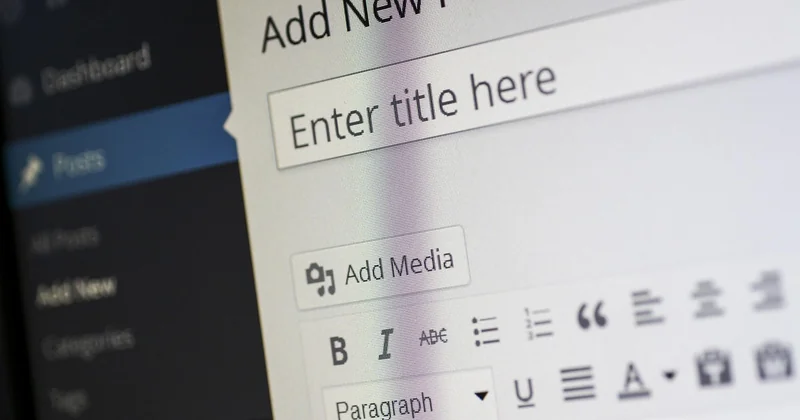
WordPress media library
In WordPress, go to Media → Library, click the image, and you'll see the "Alternative Text" field on the right. Fill it in and save. That's the whole process for one image. The catch is that if you uploaded 200 images before you knew about alt text, you have 200 fields to fix — and no built-in way to do it in bulk.
My honest advice: don't try to fix everything at once. Prioritize images that are actually indexed and getting impressions (check the Image Search section in Search Console), and fix those first. I did this on one client site last year — we fixed the top 40 most-impressed images out of ~900 and saw image search clicks climb from around 20/month to just under 90/month over the following quarter. Not spectacular, but it was a real, measurable lift from roughly four hours of work.
Elementor and page builders
In Elementor, click the image widget, open the Content tab, and the "Alt" field is right there under the image. Same idea in most page builders — the field is usually tucked into the widget settings, not the media library. This is a frequent oversight: someone updates the alt text in the media library, then wonders why the page still shows a blank alt. The widget-level setting can override the library value.
Whichever builder you use, preview the page in your browser and inspect the rendered HTML. If the alt="" is empty, you haven't actually set it. That five-second check catches more problems than any tool I've used.
Do you need an image alt text optimizer tool?
You might have seen tools marketed as "image alt text optimizers." I've tried a few. My opinion: they're useful for auditing, not for writing. An audit tool will crawl your site and list every image missing alt text — that's genuinely handy when you've inherited a site from someone else. What they won't do is write alt text that isn't generic slop. The AI-generated suggestions I've tested tend to default to "image showing a person at a desk" regardless of whether it's a person at a desk, a person on a bench, or actually a dog.
Here's the workflow I'd actually recommend:
- Run an audit tool (Screaming Frog and similar tools have image reports) to find images missing alt text.
- Sort by which pages and images get impressions in Search Console.
- Write the alt text yourself for the top 20-50, keeping the length and descriptive rules above.
- Add it via the media library, then double-check the page's rendered HTML.
- Check back in a few weeks.
Best practices for alt text in 2026
The biggest shift in the last year or two is that alt text now plays a role beyond accessibility and traditional image search. Multimodal AI systems read alt text as part of understanding what a piece of content is about, and that has quietly raised the stakes on getting it right. I'll admit, I found this out the hard way — one of my clients had a product gallery where the alt text was generated by a batch script and every single image read "product image." They ranked fine for years. Now they don't show up in visual answer experiences at all, because the alt text tells the system nothing.
What actually changed (and what didn't)
What didn't change: alt text is still fundamentally an accessibility feature, and treating it as anything else first is a mistake. Length guidance still holds. The empty-alt convention for decorative images is still correct.
What did change: the bar is higher. Sloppy, generic alt text used to be survivable. Increasingly it isn't, because visual and multimodal search experiences are trained to reward text that actually discriminates between images. "Red sneaker" vs "red leather sneaker with white laces" — the second one is more useful to a system deciding which image matches a query, and it's more useful to a screen reader user, and honestly it's more useful to me when I'm skimming my own media library.
A practical checklist you can apply today
- Does the alt text describe the image's content in one clear sentence?
- Is it under ~125 characters?
- Does it avoid "image of," "picture of," "photo of"?
- Is the keyword (if any) natural and not repeated more than once?
- Is it empty (
alt="") for decorative images? - Does the rendered HTML actually show what you set?
- Would a blind user reading the page aloud get the same information as a sighted user?
That last question is the one that cuts through all the SEO noise. If the answer is yes, you're probably doing it right. If the answer is no, no keyword density score will fix it.
The alt text you write today still speaks for your images next year
There's a quiet trap in image SEO: alt text is set once and forgotten. Your page gets redesigned, images get swapped, and the alt text underneath quietly drifts out of sync with what's actually being shown. A gallery image that used to show a red coat now shows a green one, and the alt text still says red — because nobody went back to check.
Which is why I'd rather you treat alt text as a living thing than a one-time task. Batch it into your publishing routine, not as a project. Fix the high-traffic images first. Check the rendered HTML. And when in doubt, describe what you actually see — not what you wish a search engine would see. That's the whole game.


